I prefer minimal note-taking tools. I want a scratchpad to drop quick thoughts, temporary code snippets, saved links, and quick checklists without managing a complex hierarchy.
I tried Notion, Obsidian, and Affine. They’re capable tools, but for quick scratch notes they bring too much friction. Opening a heavy app, waiting for loading screens, and managing vault structures gets in the way of capturing an idea.
Finding Firefox Notes
Eventually I landed on Firefox Notes. Because my daily workflow revolves around an open browser window, having a scratchpad right in the sidebar made sense.
It had zero clutter. No loading delay, no heavy UI elements, and no RAM bloat. It stayed out of the way.
I fell in love with that workflow, but ran into a dealbreaker: Firefox Notes is deprecated and doesn’t support syncing across instances. Older screenshots suggest sync existed at some point, but the extension operates as isolated local storage.
That created two problems:
- Moving between desktop and laptop meant my notes didn’t follow me.
- Formatting a drive, upgrading an OS, or switching machines lost all local notes.
I wanted cross-device sync without abandoning the minimalist design. Setting up custom backend servers, managing databases, or handling user authentication felt like overengineering for a simple scratchpad.
Discovering storage.sync
While researching WebExtension APIs, I looked deeper into browser.storage.sync.
Most browsers include built-in storage engines designed for extension settings and small data structures. When an extension writes data to storage.sync, the browser automatically replicates that data to any instance signed into the same browser account (such as Firefox Sync).
What makes storage.sync useful for this use case:
- Zero server maintenance. The browser vendor handles transport, synchronization, and conflict resolution.
- Built-in encryption. Data is encrypted using the user’s browser account credentials before leaving the machine.
- Zero authentication overhead. Users don’t register new accounts or manage extra login tokens.
The API imposes storage limits (100KB total capacity in Firefox), which forces keeping data structures lightweight: a natural match for a scratchpad.
Building FireNotes
I built FireNotes, an open-source Manifest V3 extension modeled on the simplicity of Firefox Notes.
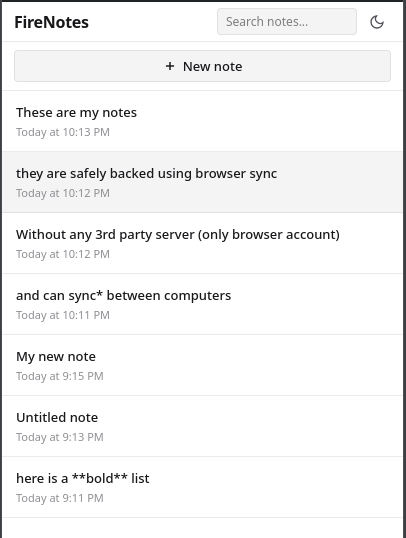
I built it around three design choices:
- Dual-layer persistence. Writes save instantly to
storage.localfor 0ms editor latency, then queue a debounced background write tostorage.sync. - Live Markdown formatting. The editor renders headings, bold text, lists, and task checkboxes inline as text is typed.
- Single-input title derivation. There’s no separate title field. The first line of a note automatically becomes its title in the list view.
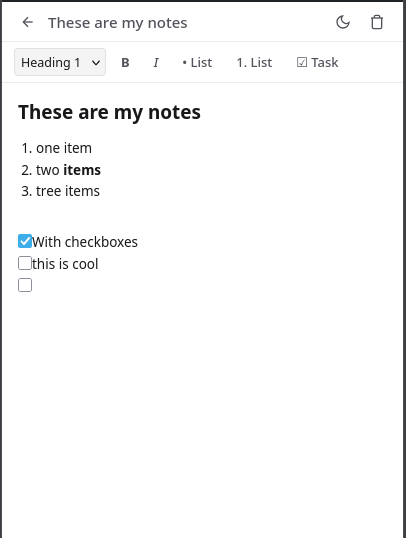
It includes a dark and light theme toggle, task checkboxes that auto-continue on enter, and zero third-party telemetry or external network calls.
It’s available on Firefox Add-ons. The source code is on GitHub.